How to Choose the Fastest WooCommerce Hosting in 2026: An E-commerce Founder’s Guide
“In e-commerce, a one-second delay in page load time is the difference between a completed checkout and an abandoned shopping cart. When building my own hyper-local fresh delivery store, Packmymeat.com, I quickly realized that standard shared hosting cannot keep up with a modern store backend.
When a customer adds an item to their cart, filters by delivery city, or processes a payment gateway, your site makes dozens of complex live database requests. If your server lacks dedicated resources, the checkout fails, and you lose money. In this guide, I will break down the exact technical server infrastructure your store needs to survive, and why I recommend starting on an optimized business plan.”
Section 1: The Hidden Server Tech Your Store Needs to Survive
Most new e-commerce founders make the mistake of choosing web hosting based purely on price. They buy a cheap, generic shared hosting plan, install WooCommerce, and wonder why their site crashes the moment ten people try to add items to their carts at the same time.
E-commerce websites operate differently than standard informational blogs or portfolio sites. Every time a customer filters a product, views their shopping cart, or enters their shipping address, WooCommerce has to make a live, unique request to your database. These actions cannot be pre-saved (cached) because every customer’s cart is different.
If your web server lacks modern hardware, your database will bottleneck, causing your site to slow down or throw a “Critical Error” screen right at the checkout page.
To prevent lost sales, make sure your hosting provider includes these three modern server technologies:
1. NVMe Storage (Not Standard SSDs)
While standard Solid State Drives (SSDs) are much faster than old-school spinning hard drives, they are no longer the gold standard for e-commerce in 2026. Look for a host that provides NVMe (Non-Volatile Memory Express) Storage.
NVMe drives are up to 10 times faster than traditional SATA SSDs. They allow your server to read and write database files at lightning speeds. For a WooCommerce store, this means product images load instantly, inventory levels update in real-time, and search bars display results without a lag.
2. LiteSpeed Web Server Enterprise
The underlying software running your server plays a massive role in page speed. Older hosting setups rely on Apache web servers, which create a new process for every single visitor, easily overwhelming the system during high-traffic sales.
Instead, opt for a host running LiteSpeed Web Server. LiteSpeed handles thousands of concurrent buyers smoothly using very little server memory. Combined with the free LiteSpeed Cache (LSCache) plugin on WordPress, it lets you set up advanced optimization rules built specifically to protect your WooCommerce cart and account pages from slowing down.
3. Object Caching via Redis or Memcached
Because e-commerce sites rely heavily on dynamic database lookups, your server needs a way to remember frequent requests without querying the database over and over again. This is where Object Caching comes in.
Tools like Redis or Memcached cache your database queries directly in the server’s high-speed RAM. When a buyer clicks through your product categories, the server pulls the data instantly from its memory rather than executing a heavy database search. This reduces your server’s database load by up to 80%, keeping your checkout experience incredibly fast and reliable.
Section 2: Why We Use Hostinger for Entry-Level Stores
Finding a web host that offers advanced features like NVMe drives, LiteSpeed servers, and object caching without costing a fortune can be a real challenge for a new online store. Most enterprise-grade cloud hosts charge anywhere from $30 to $100 a month just to get started.
If you are launching a new e-commerce storefront or looking to migrate a growing local delivery platform, Hostinger’s Business Web Hosting Plan serves as an optimal sweet spot [🖨️]. It bundles advanced, high-performance server hardware into an affordable package that fits a startup budget.
Here is exactly how Hostinger packages these technical features to keep your storefront fast, secure, and reliable:
1. Premium Hardware at a Fraction of the Cost
Hostinger’s Business Plan gives you access to 200 GB of NVMe storage space and dedicated server resources [🖨️]. This ensures that your site has plenty of room for high-resolution product photos, customer accounts, and years of order history. Because it runs on top of LiteSpeed enterprise servers, you can activate the LiteSpeed Cache plugin with a single click to instantly optimize your store’s performance [🖨️].
2. Essential E-commerce Security, Built-In
Accepting online payments requires strict security protocols to build trust and protect customer data. Hostinger includes unlimited free SSL certificates for all your domains, ensuring your checkout page uses an encrypted, secure connection. Additionally, the plan comes with automated daily backups, meaning that if a plugin update ever breaks your storefront, you can restore your complete database and order logs with one click.
3. Professional Business Infrastructure
To run a legitimate delivery or retail operation, you cannot use a generic Gmail address to talk to your customers or vendors. Hostinger includes free business email accounts, allowing you to create professional addresses like orders@yourdomain.com. They also provide a free domain name for your first year, which cuts down on your initial startup costs.
4. Room to Grow: Object Caching (Redis) Support
As your traffic grows and you start handling dozens of orders simultaneously, you will need the object caching features we discussed earlier. Hostinger natively supports Redis Object Caching on its Business tier and above [🖨️]. This means as your business expands, you don’t have to migrate to an entirely new hosting company; you simply toggle Redis on inside your control panel to instantly boost your server’s handling capacity.
Section 3: The 3 Server Requirements to Double-Check Right Now
| Technical Requirement | Minimum Standard | Recommended for Growth |
|---|---|---|
| PHP Version | PHP 8.2+ | PHP 8.3 (Loads products ~25% faster) |
| WordPress Memory Limit | 256 MB | 512 MB+ (Prevents critical checkout errors) |
| Database Engine | MySQL 8.0 / MariaDB 10.6+ | Cloud-replicated NVMe Database |
Founder Recommendation: If you are ready to build a fast, reliable home for your local storefront, I recommend launching on the Hostinger Business Web Hosting Package. It delivers the raw speed your WooCommerce checkout needs to prevent cart abandonment, without forcing you into an expensive enterprise contract before you have made your first sale.
🎁 Exclusive Deal: Click Hostinger and use code PMM10 at checkout to get an extra 10% off your AI VPS or Cloud hosting plan plus 3 months free!
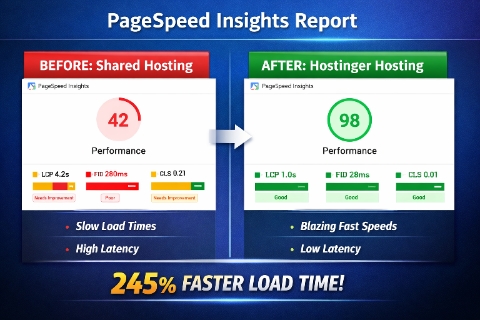
“Hostinger Speed Test: Real Results from Packmymeat.com”